Patna's #1 Free Typing Platform

Master Typing. Score Higher.

Practice for English Typing |

Learn English & Hindi typing free with visual keyboard, finger placement guides, and government exam–style speed tests. Built for Patna High Court, BSSC, SSC & Bihar Court aspirants.

100% Free Forever
⚡ No Signup Required
🏛️ Govt Exam Ready
Person touch typing on keyboard with correct finger placement
Home Row
ASDF   JKL;
Avg Gain
+18
WPM in 4 weeks
🆓
100%
Free Forever
⌨️
2
Languages
EN & Hindi
📚
4
Practice
Modules
🏛️
5+
Govt Exams
Covered
🎯
0
Signup
Required
Practice Modules

Everything to Master Typing

Structured lessons from beginner to advanced — English & Hindi, completely free.

Touch Typing Technique

Use the Right Finger
on Every Key

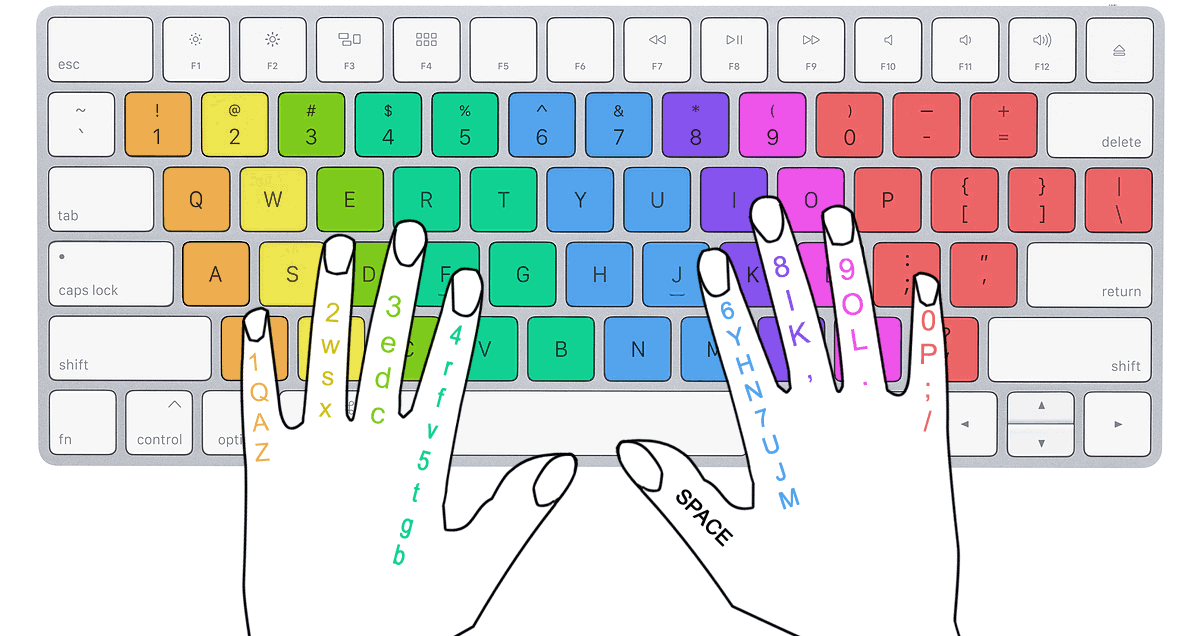
Touch typing means never looking at the keyboard. Each finger is responsible for a specific set of keys — follow the colour guide and build muscle memory the right way from day one.

Left Pinky — Q A Z
Right Pinky — P ; /
Left Ring — W S X
Right Ring — O L .
Left Middle — E D C
Right Middle — I K ,
Left Index — R F V T G B
Right Index — U J M Y H N
Both Thumbs — Space Bar
💡 Pro Tip
Always return your fingers to the Home Row (ASDF · JKL;) after pressing any key. The F and J keys have tactile bumps — feel them to find your position without looking.
Finger position on keyboard — colour-coded touch typing guide showing which finger covers each key
★ Always return to Home Row · ASDF   JKL; ★
Platform Features

Built for Serious Aspirants

Every feature mirrors the real government exam typing interface so you practice exactly as you will perform on exam day.

⌨️
Visual Keyboard + Finger Guide
Colour-coded on-screen keyboard shows which finger to use for every key — fastest way to build correct muscle memory.
📊
8-Metric Performance Dashboard
After every test: Gross Speed, Net Speed, Error%, Full Mistakes, Half Mistakes, Backspace count, Key Depressions & more.
⚖️
Full & Half Mistake Rules
Error evaluation follows the official Patna High Court notification — word-by-word, just like the real exam.
🕐
Flexible Timed Tests
1, 2, 3, 5, 10, or 15-minute sessions. Upload your own passage or use our built-in exam-level content library.
🖋️
Hindi Mangal & Krutidev
Switch between Mangal (Unicode/Inscript) and Krutidev (Remington) with dedicated Devanagari visual keyboards — both free.
🔍
Passage Comparison View
Side-by-side diff of your typed text vs original — line-by-line with green/red highlighting to pinpoint every mistake.
Government Exam Prep

Prepare for Bihar & Central Govt Typing Exams

Targeted speed benchmarks and evaluation rules for each government typing exam — practice smarter, not just harder.

English
Patna High Court
Computer Operator
90%
Min. accuracy required
400 words · 10 min
Full & Half Mistake rules
Hindi
Patna High Court
Steno / Hindi Typist
85%
Min. accuracy required
300 words · 10 min
No error highlighting
English
SSC CHSL
Data Entry
35
WPM required
15-minute test
English
BSSC
Data Entry Operator
30–35
WPM required
Bihar government exam
Hindi
Bihar Court
Clerk / Steno
25–30
WPM · Mangal font
Inscript keyboard

Patna High Court Typing Test — Official Rules

  • Passage displayed on upper half of screen; typing area directly below — no auto-scrolling.
  • No limit on Backspace — candidates can correct their mistakes freely.
  • No error highlighting, word highlighting, or typed-word highlighting in Steno pattern.
  • English passage ≈ 400 words, Hindi ≈ 300 words (±5%) — both within a 10-minute time limit.
  • Minimum 90% accuracy for English and 85% accuracy for Hindi required to qualify.
  • Errors calculated word-by-word using Full Mistake and Half Mistake rules.
  • Thumb Rule: Type at or above required speed with high accuracy — accuracy is the deciding factor.
How to Start

Learn Typing in 3 Simple Steps

No registration. No download. Open the browser and start typing in seconds — completely free.

1
Choose Your Lesson
Pick English or Hindi. Start with Home Row (ASDF JKL;) — the foundation of fast, accurate touch typing.
2
Practice with Visual Keyboard
Type each character guided by the colour-coded on-screen keyboard. Instant feedback on every single keystroke.
3
Test & Track Your Speed
Run a timed test and review your Performance Dashboard — WPM, accuracy, mistake count & full passage comparison.
Start Free Now Take Speed Test
Student practicing online typing at desk — Acubens typing course Patna
Average Improvement
+18 WPM
in 4 weeks of daily practice
FAQs

Frequently Asked Questions

Everything about Acubens Typing Platform and Patna High Court exam rules.

What is the typing interface pattern for Patna High Court English & Hindi typing test?
+

The passage is on the upper half of the screen; typing area is directly below. Key rules:

  • No auto-scrolling — scroll manually if needed.
  • No limit on Backspace — candidates can correct mistakes freely.
  • No error highlighting, word highlighting, or typed-word highlighting (Steno pattern).
  • English ≈ 400 words; Hindi ≈ 300 words (±5%); time limit 10 minutes.
What are Full Mistake and Half Mistake rules in Patna High Court exam?
+

Evaluated word-by-word per the official Patna High Court notification:

  • Full Mistake — completely wrong, missing, or extra word.
  • Half Mistake — minor error/spelling variation within a word.
  • Acubens uses the same method so you practice exactly as per the exam pattern.
What accuracy is required to qualify in Patna High Court typing test?
+
  • English typing: Minimum 90% accuracy required.
  • Hindi typing: Minimum 85% accuracy required.

Thumb Rule: As long as you type at or above the required speed, accuracy is what separates you. Focus on accuracy first — speed follows naturally.

Is there error highlighting or auto-scroll in the Patna High Court steno typing exam?
+

As per the Patna High Court Steno typing exam pattern:

  • No auto-scrolling.
  • No limit on Backspace — candidates can correct freely.
  • No error highlighting, no word highlighting, no typed-word highlighting.

Practicing on Acubens prepares you for this exact interface — no distracting highlights, just raw typing.

How can I learn English or Hindi typing online for free?
+

Acubens offers 100% free typing lessons — no registration, no payment, no app. Follow this order:

  • Start: Home Row (A S D F G H J K L ;)
  • Then: Top Row (Q W E R T Y U I O P)
  • Then: Bottom Row (Z X C V B N M)
  • Finally: Full Keyboard — words and sentences
Can I learn Hindi Mangal font typing on Acubens? Is Krutidev also supported?
+
  • Mangal (Unicode / Inscript) — required for Patna High Court, Bihar Court & most Hindi govt exams. Visual keyboard shows the correct Inscript layout.
  • Krutidev (Remington) — used in some older Bihar offices. Switch from the font dropdown in any Hindi lesson or test.
What typing speed is required for BSSC, SSC CHSL, and Bihar Court exams?
+
  • SSC CHSL Data Entry: 35 WPM in English (15 min).
  • BSSC Data Entry Operator: 30–35 WPM in English.
  • Bihar Court Clerk / Steno: 25–30 WPM in Hindi (Mangal).
  • Patna High Court Typist: 90% accuracy English / 85% Hindi within 10 minutes.
How long does it take to reach 30–35 WPM typing speed?
+

With 30–60 min of daily focused practice, most beginners reach 30 WPM in English within 4–6 weeks. For Hindi Mangal, 6–8 weeks to reach 25 WPM. Key tips:

  • Always use correct finger placement — never look at the keyboard.
  • Start slow and accurate — speed follows accuracy naturally.
  • Master Home Row first before advancing to other rows.
  • Run a timed test every 2–3 days to track progress.

Best Free Online Typing Course in Patna for Government Exams

🏛️

Acubens is Patna's free online typing platform designed for government exam aspirants in Bihar. Whether you are preparing for the Patna High Court typing test, BSSC Data Entry, Bihar Court Clerk, or SSC CHSL, our platform provides structured lessons, visual keyboard guidance, and exam-realistic speed tests — all at zero cost.

⌨️

Our lessons follow a proven method: start with the Home Row (ASDF JKL;), then Top Row, Bottom Row, and finally practise full passages. Each lesson focuses on correct finger placement, building muscle memory so you never need to look at the keyboard.

📊

For Hindi typing, Acubens supports both Mangal font (Unicode Inscript) and Krutidev font (Remington) with dedicated Devanagari visual keyboards. Speed test results include a full Performance Dashboard — Gross Speed, Net Speed, Full Mistakes, Half Mistakes, Error% — exactly what you need for Patna High Court and Bihar government exams.

Start Typing.
Start Winning.

Join thousands of aspirants in Patna and Bihar practising daily on Acubens. Free forever — no signup, no download, no excuses.

Student learning typing online — Acubens platform

Free Online Typing Test for Government Exams in Patna, Bihar

Acubens is a free online typing platform designed for students in Patna, Bihar preparing for government exams. Whether you need to clear the BSSC (Bihar Staff Selection Commission), SSC CHSL, Railway, CRPF, ITBP, BSF, CISF, or Patna High Court typing test — Acubens has you covered.

Practice both English typing and Hindi typing with support for Kruti Dev (Remington) and Mangal (Inscript) font layouts. Our visual keyboard guide helps beginners learn touch typing from scratch, while timed speed tests let you check your WPM (Words Per Minute) and accuracy instantly.

Most government exams in Bihar require 35 WPM in English and 30 WPM in Hindi with minimum 85-90% accuracy. Acubens typing tests follow the exact exam pattern — passage on top, typing area below, with real-time WPM and accuracy tracking. No signup needed. 100% free.

Unlike offline typing centres in Patna, Acubens lets you practice anytime from your phone or computer. Start with our step-by-step lessons, then move to timed speed tests. Thousands of students in Bihar already use Acubens to prepare for Civil Court stenography, High Court computer operator, and BSSC clerk typing exams.